
Headless WordPress with Next.js: Architecture Blueprint (2026)


WordPress hasn’t disappeared—it has evolved.
For years, it handled everything: content management, design, rendering, and delivery. That monolithic approach still works for many websites. But today’s digital experiences demand more—faster performance, app-like interfaces, and the ability to scale across multiple platforms.
This is where headless WordPress with Next.js becomes relevant.
Instead of replacing WordPress, modern teams are redefining its role. WordPress becomes the content engine, while Next.js handles frontend delivery. The result is a faster, more flexible, and scalable architecture.
This guide is not a basic introduction. It’s a practical architecture blueprint to help you understand how it works, when to use it, and how to implement it effectively.
What Headless WordPress Actually Means
At a technical level, headless WordPress is simple:
- WordPress manages content
- The frontend is built separately
- APIs connect the two
But the impact of this separation is significant.
In a traditional setup, content, templates, and rendering logic are tightly linked. In a headless setup, content is treated as structured data that can be delivered anywhere—not just into a predefined theme.
This shifts WordPress from being a “website system” to a content platform.
Why This Shift Is Happening Now
Headless WordPress is not new. What’s changed is the environment around it.
Performance is now a ranking factor
Performance used to be a technical concern. Today, it’s directly tied to SEO and revenue.
Frameworks like Next.js give teams control over how content is rendered:
- Static pages for speed
- Server-rendered pages for dynamic data
- Incremental updates without rebuilding the entire site
This level of control is difficult to achieve in traditional WordPress setups without heavy optimization.
Frontend expectations have changed
Users expect fast, responsive, app-like interfaces. That includes:
- Smooth transitions
- Real-time updates
- Highly interactive components
Traditional themes are not built for this level of flexibility. A decoupled frontend allows teams to design experiences without working around template constraints.
Content is no longer tied to a single channel
Businesses increasingly publish content across:
- Websites
- Mobile apps
- Internal systems
- Third-party platforms
In a headless setup, content is structured once and reused everywhere. This makes WordPress more valuable as a backend than it ever was as a monolithic system.
Architecture Breakdown: How It Actually Works
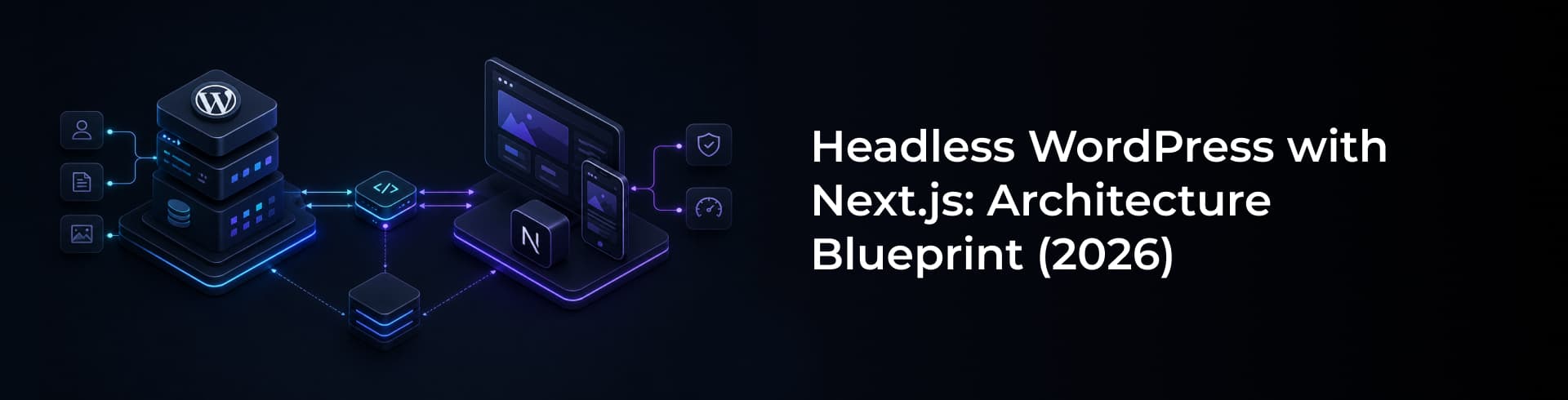
A headless WordPress setup is not one tool—it’s a system of layers working together.
1. WordPress as the Content Layer
WordPress remains responsible for:
- Content creation and editing
- Content structure (custom post types, fields)
- Media management
- Editorial workflows
The key difference is that WordPress is no longer responsible for rendering pages. It stores and organizes content, but does not control how it is displayed.
In practice, this often involves defining structured content models rather than relying on page builders.
2. The API Layer
The API is what makes headless architecture possible.
WordPress exposes content through:
- REST API (built-in)
- GraphQL (via plugins like WPGraphQL)
The choice between REST and GraphQL depends on complexity:
- REST is simpler and sufficient for many use cases
- GraphQL offers more control for complex data relationships
Authentication also becomes important at this layer, especially for protected content or preview environments.
3. The Next.js Frontend
Next.js is commonly used because it solves multiple frontend challenges at once.
It supports:
- Server-side rendering (for dynamic pages)
- Static generation (for performance)
- Incremental static regeneration (for updates)
This allows teams to choose how each page behaves instead of applying one approach across the entire site.
From an architectural perspective, this is where most performance gains come from.
Teams building at this level typically rely on modern frontend practices and frameworks, often supported by specialized Next.js development expertise.
4. Caching and Delivery
Performance in headless systems is largely driven by how content is cached and delivered.
A typical setup includes:
- CDN for global delivery
- Edge caching for fast response times
- Page-level caching through Next.js
The goal is to minimize the number of times the frontend needs to request fresh data from WordPress.
5. Deployment and Infrastructure
A production-ready setup separates concerns clearly:
- Frontend deployed on platforms like Vercel or AWS
- WordPress hosted independently
- CI/CD pipelines managing deployments
- Preview environments for content validation
This separation allows frontend and backend to evolve independently.
Data Flow: What Happens on a Request
Understanding the flow helps clarify why this architecture works.
- A user visits a page
- Next.js determines how the page should be rendered
- If needed, it fetches data from WordPress via API
- WordPress returns structured content
- The frontend renders the page
- The result is cached and delivered through a CDN
In many cases, this process is optimized so that WordPress is not queried on every request.
SEO in Headless WordPress: Where Things Break
One of the biggest misconceptions about headless architecture is that performance alone guarantees SEO success.
It doesn’t.
SEO responsibilities shift from WordPress to the frontend.
Key areas that require deliberate implementation:
Metadata
Titles, descriptions, and social tags must be passed correctly from WordPress to the frontend.
URL structure
URLs need to be consistent and mapped correctly between systems.
Sitemaps
Sitemaps are no longer automatically handled—they must be generated intentionally.
Indexing control
Robots directives and canonical tags must be managed in the frontend.
Preview functionality
Editors need to see unpublished content in a way that reflects the final output.
Without these elements, even a fast site can struggle to rank. This is where deeper technical SEO implementation becomes essential in headless builds.
When Headless WordPress Makes Sense
Headless architecture is not a default choice—it’s a strategic one.
It works best when:
- Performance is a critical requirement
- The frontend experience is highly customized
- The system needs to scale over time
- Content must be reused across multiple platforms
In these cases, the added complexity is justified by long-term flexibility.
When It Doesn’t
Headless WordPress introduces complexity.
It may not be the right choice if:
- The website is relatively simple
- There is no dedicated development team
- Budget constraints are significant
- Time-to-launch is the primary priority
For many businesses, traditional WordPress remains the more practical option.
Headless vs Traditional WordPress
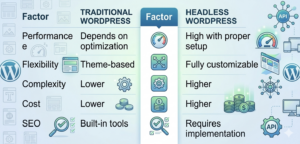
A more detailed breakdown of these trade-offs can be found in this comparison of headless and traditional WordPress.
Common Mistakes Teams Make
Most issues in headless projects are not technical—they are architectural.
Common mistakes include:
- Treating it as a frontend upgrade instead of a system redesign
- Ignoring preview workflows for content teams
- Underestimating SEO requirements
- Overcomplicating simple use cases
- Failing to define clear data structures
Headless systems require planning, not just implementation.
A Practical Way to Approach It
In real-world projects, the best results often come from a balanced approach.
A typical implementation might include:
- WordPress for content management
- Next.js for frontend delivery
- CDN for performance
- Structured APIs for data flow
- CI/CD for deployment
In many cases, hybrid models—where some parts remain traditional—offer the best balance between flexibility and complexity.
Final Take
Headless WordPress with Next.js is not about replacing WordPress. It’s about using it more effectively.
For the right projects, it enables:
- Better performance
- More control over user experience
- Scalable architecture
But it also introduces new responsibilities:
- Architecture planning
- SEO implementation
- Ongoing maintenance
The decision is not about what is “better.” It’s about what fits the problem you’re solving.
FAQs
What is headless WordPress with Next.js?
Headless WordPress with Next.js is a decoupled architecture where WordPress manages content as a backend CMS, and Next.js handles frontend rendering using APIs like REST or GraphQL.
Is headless WordPress more expensive?
Yes. It involves higher development and infrastructure costs due to separate frontend and backend systems.
Can WordPress REST API be used with Next.js?
Yes. The WordPress REST API is commonly used to fetch content into Next.js applications for rendering pages.
Is Next.js required for headless WordPress?
No, but it is one of the most popular frameworks due to its performance features like SSR, SSG, and ISR.