

AI Chatbots on Corporate Websites: Where They Help and Where They Create Risk
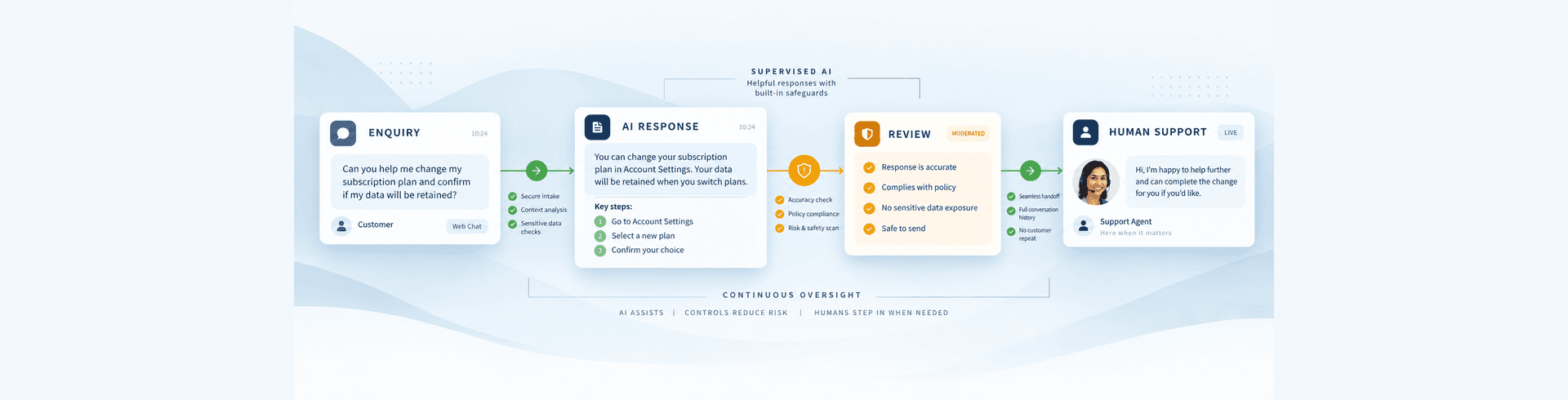


AI chatbots on corporate websites can improve discovery, support, routing, and access to approved information. They can also create new risks when a conversational system collects sensitive information, invents answers, contradicts brand policy, excludes users, or makes decisions that nobody can explain. The difference between a useful chatbot and an expensive incident is usually governance, not the model alone.
Enterprise teams should treat website AI as a product with a defined purpose, accountable owner, controlled data, measurable outcomes, and a safe failure mode. Start with the user problem, then decide whether AI is justified. Compliance, brand, security, accessibility, and UX requirements should shape the design before procurement or development begins.
Where corporate website chatbots can help
Chatbots are most useful when conversation makes a bounded task easier. They can guide visitors to relevant services or documentation, retrieve answers from current approved sources, collect structured context before a human handoff, route enquiries to the correct team, and support users outside normal service hours. They may also help employees or partners navigate a large controlled knowledge base when permissions are enforced correctly.
The value comes from reducing effort and ambiguity, not from making the interface appear intelligent. A chatbot should shorten a known journey, improve access to trusted information, or create a better handoff. If it merely repeats content already easy to find, adds another layer before contact, or encourages users to disclose unnecessary information, it may make the experience worse.
Where corporate website chatbots create risk
Risk rises when a chatbot moves beyond navigation and approved-content retrieval into advice, eligibility, commitments, complaints, transactions, or decisions with legal, financial, health, employment, or safety consequences. Open-ended scope, weak source control, unclear disclosures, inaccessible interaction, excessive data collection, and unreliable escalation can turn a convenience feature into a trust problem.
Corporate chatbots also create operational risk when nobody owns the knowledge, evaluates answers, monitors production behaviour, or responds to incidents. A strong demonstration is not evidence that the system will remain accurate across languages, edge cases, malicious prompts, policy changes, and vendor updates.
Start with a narrow, measurable use case
“Add AI to the website” is not a useful requirement. A practical brief identifies the audience, task, input, output, business outcome, acceptable error, and escalation path. Examples include helping users find relevant documentation, summarising approved content, translating a draft for human review, routing an enquiry, or suggesting related resources.
Narrow use cases are easier to test and govern. A tool that retrieves answers from an approved knowledge base has a clearer boundary than an open-ended assistant expected to advise on every product, policy, and customer situation. Teams can expand capability after evidence shows that the first use case is accurate, safe, and useful.
Define a baseline before implementation. Measure current search success, support demand, completion time, abandonment, content effort, or conversion quality. Without a baseline, increased interaction with an AI feature can be mistaken for business value.
Decide whether AI is actually necessary
Some website problems need better navigation, search, content, forms, or service design rather than a probabilistic model. If users cannot find return information because labels are unclear, improving information architecture may be safer and cheaper than adding a chatbot.
Compare AI with rules, filters, conventional search, editorial recommendations, and workflow automation. Use AI where it adds meaningful understanding, generation, prediction, or flexibility that simpler methods cannot provide. The simplest reliable solution is usually easier to explain, monitor, secure, and maintain.
This decision should also consider total lifecycle cost: model usage, integration, data preparation, evaluation, moderation, monitoring, support, retraining, vendor management, and incident handling. The principles in the enterprise website TCO and ROI framework help make that comparison transparent.
Create accountable AI governance
Every feature needs a named business owner and technical owner. Depending on risk, governance may also involve privacy, legal, security, brand, accessibility, content, customer service, procurement, and analytics teams. Approval should be based on evidence against defined criteria, not enthusiasm for a demonstration.
Maintain an inventory of website AI systems, including purpose, audience, vendor, model, data sources, personal data, integrations, decisions influenced, markets, controls, monitoring, and review date. This inventory helps teams identify duplicated tools, hidden dependencies, and features whose original justification no longer applies.
Classify risk by potential impact. A related-article suggestion is not equivalent to eligibility guidance, financial information, health advice, recruitment screening, or a complaint response. Higher-impact uses require stronger evidence, restricted scope, human oversight, and specialist review.
Map applicable compliance requirements early
Compliance depends on the organisation, location, sector, users, data, and function. Requirements may involve privacy, consumer protection, accessibility, record keeping, advertising, intellectual property, employment, financial services, health, or other sector-specific rules. Qualified legal and compliance advisers should confirm obligations for the specific implementation and markets.
Create a data-flow map showing what users provide, what the website adds, where information is sent, which provider processes it, where it is stored, who can access it, how long it is retained, and which downstream systems receive the output. Include logs, analytics, support transcripts, feedback, and model-improvement programmes.
Document the lawful and approved basis for processing, necessary notices, consent where applicable, user rights, retention, security, and cross-border handling. Do not assume that a vendor’s general compliance statement resolves the organisation’s own responsibilities.
Minimise data before it reaches the model
Do not collect personal or confidential information merely because a conversational interface makes it easy. Design prompts, forms, and instructions to discourage unnecessary disclosure. Redact or transform sensitive values before sending them to external services where feasible.
Use allowlists for trusted data sources and restrict access by role. Separate public content from confidential internal knowledge. Retrieval systems should enforce permissions at query time so a user cannot access a document simply because the model knows it exists.
Review logging carefully. Detailed logs help evaluation and incident investigation, but they may contain user prompts, generated answers, identifiers, or business information. Limit collection, protect access, define retention, and test deletion processes.
Choose vendors using evidence, not claims
Vendor assessment should cover model and service changes, data usage, training policies, retention, hosting regions, subprocessors, security, access control, incident notification, availability, portability, audit rights, and termination. Understand whether prompts or outputs are used to improve shared models and what controls are available.
Evaluate operational dependence. Can the organisation export prompts, evaluations, configuration, and knowledge sources? What happens if the provider changes a model, policy, price, or safety behaviour? A fallback or exit plan should exist before the feature becomes a critical customer channel.
Procurement should test the exact service tier and configuration intended for production. Consumer and enterprise offerings may have different controls. Contract review should reflect the actual data and use case rather than a generic AI questionnaire.
Ground outputs in approved information
Generative systems can produce plausible but unsupported answers. Retrieval from an approved knowledge base can reduce this risk by giving the model relevant source material. It does not guarantee accuracy: retrieval may select the wrong content, sources may be outdated, and the model may still combine information incorrectly.
Define authoritative sources, ownership, review dates, and publication status. Exclude drafts, expired policies, inaccessible documents, and conflicting versions. Answers should link to or clearly identify the source where useful, allowing users to verify important information.
For high-impact topics, restrict the assistant to navigation and retrieval rather than advice. Use clear refusal and escalation behaviour when evidence is missing, confidence is insufficient, or the request falls outside scope.
Protect brand voice without hiding uncertainty
Brand guidance for AI should define tone, terminology, prohibited claims, product naming, audience, reading level, and sensitive situations. Examples of acceptable and unacceptable answers are more useful than adjectives alone. The system should remain recognisably part of the organisation without pretending to be human.
Do not let confident language disguise uncertainty. If information is incomplete, the answer should say so and offer a safe next step. Avoid anthropomorphic claims that create unrealistic expectations about understanding, authority, or confidentiality.
Test multilingual behaviour separately. Directly translated prompts may change tone, safety, and accuracy. Arabic and English experiences need reviewed terminology, right-to-left presentation, language detection, source coverage, and escalation. The wider design considerations are covered in Arabic UX, RTL, and bilingual SEO.
Design transparent, user-controlled interactions
Users should understand that they are interacting with an automated system, what it can do, what information it uses, and when a human can help. Disclosure should be clear in the interface rather than buried in terms. The feature should set expectations before users share information.
Provide an obvious way to restart, correct, dismiss, or leave the experience. Do not trap important content or support behind a chatbot. Primary navigation, search, contact, accessibility, complaints, and emergency routes should remain available independently.
Use progressive disclosure instead of a large block of warnings. Present essential limitations and data guidance at the point of use, with deeper policy information available nearby. Confirmation should be reserved for meaningful decisions rather than repeated until users stop reading.
Accessibility applies to AI interfaces
Conversational interfaces can create accessibility barriers through dynamic updates, focus movement, keyboard traps, unlabeled controls, long responses, animation, timeouts, and unclear errors. Test with keyboards, screen readers, zoom, high contrast, reduced motion, and voice input where relevant.
Announce new messages without interrupting users, preserve reading position, and provide clear labels for input, send, stop, retry, feedback, and attachments. Allow users to review what will be submitted. Do not rely on colour alone for confidence, status, or warnings.
AI output itself should be accessible: structured headings, concise paragraphs, meaningful links, plain language, and alternatives for generated media. A conventional non-AI route should remain available when the feature cannot meet a user’s needs.
Security requires more than protecting an API key
AI features introduce risks such as prompt injection, data leakage, malicious files, unsafe tool use, excessive permissions, denial of service, and output that encourages harmful actions. Treat model input and retrieved content as untrusted. Validate, isolate, and limit every action the system can take.
Never expose provider credentials in front-end code. Route requests through controlled services with authentication, rate limits, content limits, logging, and abuse detection. Tools that modify accounts, orders, records, or communications need explicit authorisation and confirmation.
Retrieval sources can contain malicious instructions. Separate system policy from retrieved content and test attempts to override controls or reveal hidden information. Security testing should include the complete chain of model, data, tools, integrations, and user interface.
Human escalation must be designed, not implied
“Contact support if needed” is not an escalation system. Define which topics, confidence levels, sentiments, or user requests require handoff. Pass useful context with appropriate consent so users do not repeat everything, while avoiding unnecessary disclosure.
State service hours and expected response. If live handoff is unavailable, offer a reliable asynchronous route. High-risk situations may need immediate specialist instructions rather than continued automated conversation.
Support teams should know what the AI has said and how to report recurring failures. Their feedback is a critical source for evaluation and content improvement.
Evaluate with realistic scenarios
A few successful demonstrations do not establish readiness. Build an evaluation set representing common tasks, edge cases, ambiguous requests, unsupported topics, adversarial attempts, languages, user abilities, and sensitive scenarios. Include known correct or acceptable outcomes and clear failure criteria.
Measure task success, factual support, relevance, refusal quality, escalation, brand alignment, accessibility, latency, and cost. Review severe failures separately; a good average must not hide a dangerous outcome. Human reviewers should represent the disciplines affected by the feature.
Test the complete website integration, not only the model API. Verify consent, session handling, analytics, responsive layouts, error states, source links, rate limits, handoff, and recovery when the provider is slow or unavailable.
Release AI capabilities gradually
Begin with internal users, a controlled audience, limited pages, or a small share of traffic. Monitor behaviour and retain a rapid way to disable the feature. Feature flags, versioned prompts, controlled knowledge sources, and rollback procedures make change safer.
Release records should identify the model, prompt, configuration, data sources, evaluation results, approvals, and monitoring plan. The controls used to prevent website development mistakes that delay launches are equally valuable for website AI, where provider behaviour and prompts can change outcomes without a visible design change.
Do not automatically expand scope because initial engagement is high. Confirm that the capability improves the intended outcome without increasing complaints, poor advice, privacy risk, or support burden.
Monitor quality after launch
Production usage will reveal questions and behaviours that testing missed. Monitor task success, unsupported answers, source coverage, escalation, feedback, abandonment, latency, cost, abuse, and downstream outcomes. Segment by language, device, market, page, and use case.
Review samples under an approved privacy process. Use automated checks to identify risky patterns, but keep human review for context and severity. Create thresholds for warning, restricted mode, rollback, and full shutdown.
Models, vendors, knowledge, laws, policies, and user expectations change. Schedule formal reviews and re-run evaluations after significant changes. A feature that passed at launch should not receive permanent approval.
Protect SEO and content integrity
AI-generated interfaces should not hide essential indexable content from users or search engines. Core service information, policies, navigation, and support routes should remain available as stable pages with crawlable links. Do not create large volumes of unreviewed generated pages or allow conversational output to become an uncontrolled source of claims.
If AI assists content production, maintain editorial accountability, source verification, originality, and update ownership. Structured data must match visible, approved content. Metadata, canonicals, sitemaps, and internal links should remain governed by the website platform rather than generated unpredictably.
Teams evaluating conversational discovery should still strengthen conventional information architecture and useful content. The same principle applies when comparing headless and traditional WordPress: flexibility is valuable only when critical search controls are deliberately engineered.
A practical website AI readiness checklist
- The use case, audience, outcome, limits, owner, and safe failure mode are documented.
- Non-AI alternatives were considered and the AI benefit is measurable.
- Applicable legal, privacy, sector, accessibility, and records requirements were reviewed by qualified owners.
- Data flows, permissions, retention, vendors, subprocessors, and exit plans are documented.
- Approved knowledge sources have owners, review dates, and access controls.
- Brand, uncertainty, refusal, language, and escalation behaviour are defined.
- The interface is transparent, accessible, optional, and easy to leave.
- Security testing covers prompts, retrieval, files, tools, permissions, and integrations.
- Realistic evaluations include edge cases, high-risk failures, and multilingual scenarios.
- Release, monitoring, incident response, rollback, and periodic review are ready.
Element8 helps organisations introduce website AI through a controlled product and governance process rather than a disconnected experiment. Our Dubai web development team can assess the use case, data flow, experience, architecture, integrations, evaluation, and release controls needed to deliver useful AI without compromising trust.
Frequently Asked Questions
What should a business check before adding AI to its website?
Define the user problem, measurable outcome, accountable owner, data flow, risk level, applicable requirements, approved knowledge, security controls, brand behaviour, accessibility, human escalation, evaluation criteria, monitoring, and a safe way to disable or roll back the feature.
Should a website tell users they are interacting with AI?
Yes. Users should clearly understand that the system is automated, what it can and cannot do, how their information is handled, and when a human or non-AI route is available. Important disclosure should appear in the experience, not only in policy text.
How can website AI reduce inaccurate answers?
Limit scope, use current approved sources, apply permission-aware retrieval, require source support, define refusals, test realistic and adversarial scenarios, monitor production output, and escalate high-risk or uncertain requests to qualified humans. These controls reduce risk but cannot guarantee perfect accuracy.
Is a chatbot the best way to add AI to every website?
No. Better navigation, search, content, forms, rules, or workflow automation may solve the problem more reliably. Use a chatbot only when conversation adds clear value and the organisation can govern its data, answers, accessibility, security, escalation, and ongoing quality.