

WordPress Access Control and Admin Governance: Roles, Approvals, MFA, and Operational Risk


WordPress access problems rarely begin with an obvious attack. They often begin with ordinary operational shortcuts: one shared administrator account, a contractor who keeps access after a project, an editor granted technical permissions to solve a temporary problem, or a plugin that gives more capability than expected. Over time, the site accumulates privileges that nobody can fully explain.
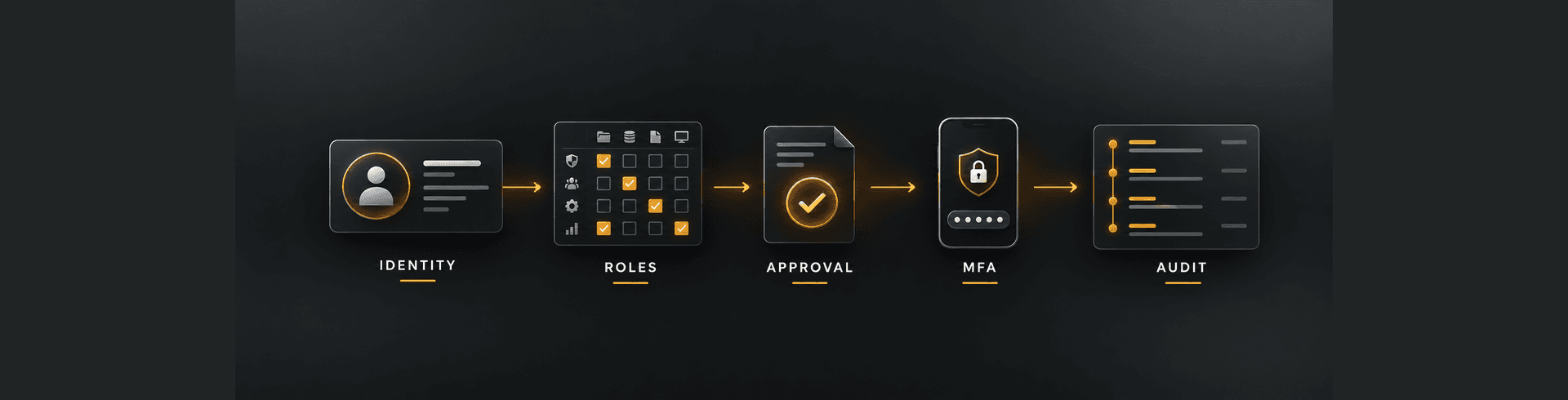
Enterprise WordPress access control should connect identities, roles, approvals, multifactor authentication, privileged actions, monitoring, and recovery. The objective is not to make routine publishing difficult. It is to give each person and system the minimum access needed, preserve accountability, and reduce the impact of mistakes, compromised credentials, and unauthorised change.
Why WordPress admin access becomes an operational risk
WordPress is designed to make publishing accessible. That strength can create risk when teams treat every operational need as a reason to grant Administrator. Administrators can install code, change users, alter settings, expose data, disrupt integrations, and disable security controls. A compromised administrator account can therefore affect the entire platform.
Risk grows with multiple agencies, markets, brands, departments, and support providers. Staff move roles, vendors change, projects finish, and emergency access remains. Without a current access register and review process, old accounts and excessive privileges become invisible.
Access control is also connected to broader platform governance. A user who can install any extension can bypass the controls described in a WordPress plugin governance programme. A user who can edit SEO settings, forms, analytics, or schema can create business impact without touching source code.
Start with named identities
Every person should use an individual account. Shared administrator credentials remove accountability and make offboarding difficult. If several people use one login, audit logs cannot show who made a change, password rotation disrupts everyone, and multifactor authentication becomes harder to manage securely.
Use a central identity provider and single sign-on where the organisation’s scale and platform support justify it. This can apply corporate authentication policy, improve offboarding, and reduce unmanaged passwords. The WordPress account should still map to a named individual and an approved role.
Service accounts also need unique identities. Integrations, deployment tools, monitoring, and automation should not reuse human accounts. Document each account’s owner, purpose, permissions, credentials, allowed source, rotation method, and shutdown process.
Design roles around real responsibilities
Default WordPress roles provide a starting point, but enterprise workflows often need more precision. Editors may require control over specific content types or markets without the ability to change plugins, themes, users, or global settings. Support teams may need to view configuration or logs without publishing.
Map job responsibilities to capabilities. Separate content creation, review, publication, user administration, configuration, plugin management, deployment, and security. Avoid creating broad custom roles without understanding the capabilities they inherit from plugins and custom code.
Test each role using a representative account. Confirm both what the user can do and what remains unavailable. Plugin updates can introduce new capabilities or admin pages, so role testing should be repeated after material platform changes.
Apply least privilege
Least privilege means access is limited by task, scope, and time. A user who publishes UAE service pages may not need access to other markets, customer records, integration credentials, or code. A developer investigating an incident may need temporary privileged access rather than a permanent administrator role.
Start with the lowest suitable role and add specific capabilities only when required. Record the business reason, approver, scope, and review date. Do not grant Administrator simply because a plugin’s permissions are unclear; investigate the required capability or change the workflow.
Separate high-risk duties
No single account should perform every sensitive step without oversight. Separation of duties reduces fraud, error, and unreviewed change. The person who develops a high-risk release should not be the only person who reviews and approves it. The person requesting privileged access should not approve their own request.
Useful separations include user administration from security review, code creation from production deployment, content creation from publication, and payment configuration from transaction reconciliation. Small teams may not achieve complete separation, but they can use peer approval, time-limited access, logging, and post-change review.
Apply stronger controls to actions with broad impact: changing authentication, installing code, editing payment settings, exporting personal data, modifying analytics or consent, changing domains, disabling backups, and altering search indexation.
Make approvals explicit
Access requests should identify the named user, required role, scope, reason, duration, approver, and system owner. Approval through an informal message may be fast, but it is difficult to audit and easy to misinterpret. Use a documented ticket or access workflow for privileged roles.
Permanent access should be the exception for external providers. Contractors and agencies should receive access for the engagement and task, with a defined expiry or review date. Extending access should require a new decision rather than silent continuation.
Emergency access needs a separate procedure. A break-glass account may be necessary when normal authentication fails, but it should be tightly protected, monitored, tested, and reviewed after every use. Emergency access should not become the everyday shortcut.
Require multifactor authentication
Passwords alone are not sufficient for privileged access. Require multifactor authentication for administrators, editors, developers, agencies, and any account that can access sensitive data or change production behaviour. Prefer phishing-resistant methods where available and suitable.
Define secure enrolment and recovery. Attackers may target the recovery process when MFA is strong. Backup methods, device replacement, help-desk verification, and lost-token handling should protect against social engineering while remaining usable during genuine incidents.
Do not allow shared MFA devices for ordinary administration. Each user should authenticate with their own approved factor. Record exceptions, apply compensating controls, and set an expiry.
Protect the login and session lifecycle
Authentication controls should include secure password policy, rate limiting, bot protection appropriate to risk, session timeouts, suspicious-login alerts, and restrictions on repeated failed attempts. Changing the login URL alone is not a primary security control.
Review whether administrators should be restricted by trusted networks, managed devices, VPN, or conditional access. Strong restrictions can reduce risk but must account for remote support and business continuity. Test the fallback process before an incident.
Terminate sessions when a password, role, employment status, or security concern changes. Removing an account should also revoke application passwords, API tokens, SSH keys, hosting access, CDN access, and related credentials outside WordPress.
Control programmatic access
WordPress application passwords, REST API credentials, webhooks, command-line access, deployment keys, and integration tokens can bypass the normal browser login experience. They need the same governance as human accounts.
Use separate credentials for each integration and environment. Limit permissions, protect secrets outside source code, rotate them, and monitor use. Do not copy production credentials into staging or developer machines. If a vendor no longer needs access, revoke the integration credential rather than only removing a dashboard user.
Map data flows and systems of record. For ecommerce and connected platforms, the ownership principles in the WooCommerce integrations guide help define which system can create, update, or reconcile important records.
Limit access to hosting and infrastructure
WordPress governance fails if users cannot change a plugin but can edit production files, databases, DNS, CDN, or hosting configuration directly. Maintain one access model across the full delivery stack, including source control, CI/CD, cloud, backups, monitoring, secrets, and domain management.
Production access should be limited and observable. Prefer controlled deployment pipelines over manual file changes. Database tools should use named accounts and approved channels. Direct changes need a documented reason, backup, validation, and review.
The release workflow should define who builds, approves, deploys, verifies, and rolls back. Use the guidance on website development mistakes that delay launches to identify uncontrolled access and change as planning risks.
Use logging that supports investigation
Audit logging should record authentication, failed login, role changes, user creation, plugin and theme changes, settings, content publication, file changes, exports, and other high-risk events. Logs should identify the user, action, target, timestamp, and relevant source context.
Store important logs where an attacker with WordPress administrator access cannot easily erase them. Protect log access and retention because logs may contain identifiers or sensitive operational details. Time synchronisation across WordPress, hosting, CDN, identity, and integrations is essential for incident reconstruction.
Logging without review provides limited value. Define alerts for critical events and assign owners. Routine activity should be searchable for audits, while suspicious behaviour should trigger timely investigation.
Review access on a fixed schedule
Access reviews should compare current permissions with employment, vendor, project, market, and role information. Ask whether each account is active, named, approved, correctly scoped, using MFA, and still required. Review privileged and external accounts more frequently.
Do not rely only on a list of WordPress users. Include hosting, source control, domain, CDN, analytics, tag management, CRM, payment, email, backup, and monitoring systems. Hidden access outside WordPress can be more powerful than the CMS role.
Track remediation to completion. An audit that repeatedly identifies dormant administrators without removing them is not an effective control.
Make offboarding immediate and complete
Offboarding should be triggered by employment or contract change, not by the next periodic review. Disable access promptly, terminate sessions, transfer content ownership, revoke tokens, recover managed devices, remove group membership, and review recent privileged activity where appropriate.
Plan for account dependencies before deletion. Scheduled posts, integrations, automation, or authorship may depend on an account. Transfer necessary ownership without preserving unnecessary login access.
For agencies, include access return and deletion in the contract and project closeout checklist. Confirm removal from password managers, shared documentation, hosting portals, support systems, and vendor consoles.
Prepare for compromised accounts
Incident procedures should explain how to disable an account, revoke sessions and tokens, preserve evidence, identify changes, rotate related secrets, restore safe configuration, and communicate with stakeholders. Practice the process before a real compromise.
Do not immediately destroy evidence by deleting everything. Security responders may need logs, user records, file changes, and timelines. Containment should prevent further harm while preserving information needed to understand scope.
If compromise affects the website, follow a full containment and recovery process rather than only changing a password. The WordPress malware cleanup and incident response playbook explains why teams must remove the root cause, validate backups, rotate credentials, and monitor recurrence.
Balance control with editorial usability
Governance should not force editors to request administrator help for routine publishing. If roles are too restrictive or approval is too slow, teams create workarounds, share credentials, or publish elsewhere. Design roles and workflows with the people who perform the work.
Use clear role names, explain permissions, provide training, and make access requests predictable. Offer safe preview, scheduling, reusable components, and content approvals. Measure publishing delays, support requests, and rejected access requests to find unnecessary friction.
Good governance makes the approved path easier than the workaround. Security and UX are aligned when users can complete legitimate tasks confidently without receiving dangerous privileges.
Account for multilingual and multi-site operations
Multi-brand, multi-region, and multilingual platforms require scope boundaries. A regional editor may need control over one site or language without access to the whole network. Global teams may own shared components while local teams own content and market details.
Document who can create, translate, approve, publish, and retire each content type. Test permissions across sites and languages, including media, menus, forms, SEO fields, and reusable blocks. The governance considerations in Arabic UX, RTL, and bilingual SEO show why language operations cannot be reduced to translation permissions alone.
A practical WordPress access governance checklist
- Every person and integration uses a unique, named identity.
- Roles map to real responsibilities and are tested after material changes.
- Least privilege, separation of duties, and time limits apply to sensitive access.
- Privileged access requires a documented request, owner, approval, and review date.
- MFA is enforced with secure enrolment and recovery.
- Sessions, application passwords, tokens, and infrastructure credentials are governed.
- High-risk actions are logged outside the reach of ordinary administrators.
- Access reviews cover WordPress and the complete delivery stack.
- Offboarding revokes all related access immediately and transfers necessary ownership.
- Compromised-account procedures preserve evidence and support rapid containment.
Element8 helps organisations establish WordPress governance that supports secure publishing without creating unnecessary operational friction. Our Dubai web development team can assess roles, privileged access, MFA, integrations, environments, release controls, monitoring, and incident readiness across the full website operating model.
Frequently Asked Questions
Should every WordPress administrator have a separate account?
Yes. Individual accounts preserve accountability, support secure multifactor authentication, and allow one person’s access to be changed or removed without disrupting others. Shared administrator credentials make auditing, recovery, and offboarding unreliable.
Which WordPress users should use multifactor authentication?
MFA should be required for administrators, editors, developers, agencies, and any account that can publish, access sensitive information, change configuration, or affect production. Higher-risk accounts should use stronger phishing-resistant methods where suitable.
How often should WordPress access be reviewed?
Review privileged and external access regularly and after role, employment, vendor, project, or security changes. The appropriate frequency depends on risk, but stale administrators and expired contractor access should not wait for an annual review.
What should happen when a WordPress administrator leaves?
Disable the account promptly, revoke sessions, application passwords, tokens, hosting and infrastructure access, transfer necessary content ownership, recover managed credentials or devices, and review recent privileged activity where the risk warrants it.