

WordPress at Scale: Enterprise SEO Considerations
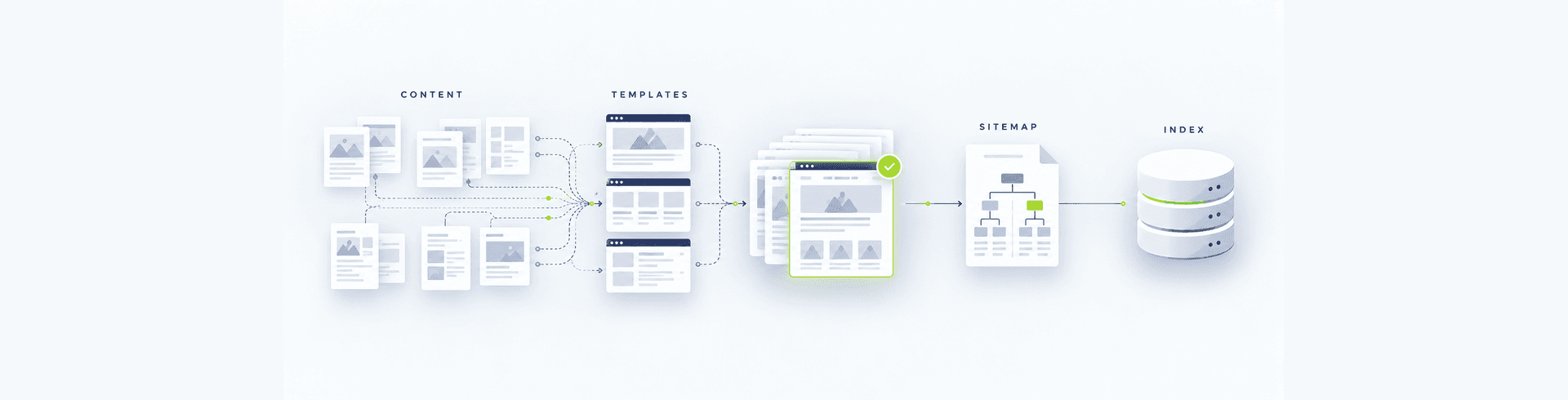


WordPress can support a large enterprise website, but scale changes the nature of SEO work. The challenge is no longer editing a few titles or publishing occasional articles. It is controlling thousands of URLs, shared templates, multiple teams, integrations, languages, releases, and governance rules without creating crawl waste, duplication, performance regressions, or inconsistent search signals.
Enterprise WordPress SEO therefore depends on architecture and operations as much as content. Search requirements must be designed into templates, publishing workflows, platform decisions, and release controls. This guide explains the considerations that help large organisations keep WordPress discoverable, consistent, measurable, and maintainable as the platform grows.
What “WordPress at scale” means for SEO
Scale can come from page volume, traffic, editorial users, business units, markets, languages, integrations, or release frequency. A site with 2,000 tightly governed pages may be more manageable than one with 300 pages created through uncontrolled plugins and duplicated templates. The important question is not only how many URLs exist, but how many systems and people can change their search behaviour.
A useful operating model identifies every source of indexable URLs, every template that controls search elements, and every team that can publish or modify them. This connects SEO to the broader enterprise website governance model instead of treating it as a final review.
Start with an intentional URL and information architecture
Large sites need a stable hierarchy that reflects user needs and business priorities. WordPress post types, taxonomies, archives, media attachments, pagination, search results, tags, parameters, and plugin endpoints can all create URLs. Teams should decide which deserve to exist, which should be indexable, and how they connect through navigation and internal links.
Document rules for slugs, folders, parent-child relationships, category archives, faceted paths, campaign pages, and retired content. Avoid letting each department invent a structure independently. A clear architecture supports crawling and reporting while making ownership visible. It also reduces the redirect burden when the platform changes.
Control templates before optimising individual pages
At enterprise scale, template defects multiply. A missing canonical on one template can affect thousands of pages; an incorrect heading pattern or empty metadata fallback can spread across an entire content type. Audit templates for titles, descriptions, headings, canonicals, robots directives, structured data, breadcrumbs, internal links, image handling, pagination, and social metadata.
Define safe fallbacks, but do not allow automation to hide missing editorial inputs. Generic titles and descriptions may technically populate fields while producing weak search results. Required fields, preview tools, validation, and documented exceptions are more reliable than expecting editors to understand every technical dependency.
Design crawl and indexation rules deliberately
WordPress installations can expose feeds, author archives, tag archives, date archives, internal search pages, attachment pages, staging paths, query parameters, and thin taxonomy combinations. Enterprise teams should maintain an indexation matrix covering each URL type and its intended canonical, robots behaviour, sitemap inclusion, and internal-link treatment.
Blocking crawling is not the same as preventing indexation. A robots.txt disallow can stop a crawler from seeing a noindex instruction. Canonicals are signals rather than guaranteed removal tools. Use the correct control for the intended outcome, then verify rendered HTML and search-engine behaviour instead of relying only on plugin settings.
Build internal linking into the content model
Navigation alone rarely distributes sufficient context across a large website. Important service, industry, product, location, and insight pages need relevant contextual links from related content. WordPress blocks and reusable patterns can help, but automatically generated sections must remain useful and should not create repetitive sitewide link noise.
Define linking expectations for editors, template-level related content, breadcrumbs, hub pages, and orphan-page monitoring. Our guide to essential business website pages explains why page purpose and journey design should be established before publishing volume expands.
Keep structured data accurate and template-aware
Structured data should describe visible content and the real entity represented by the page. Template owners need rules for organisation, breadcrumb, article, product, service, FAQ, and other supported types. Do not inject the same schema everywhere, duplicate entities across plugins, or mark up content that users cannot see.
Validate the final rendered page, not only the JSON stored in WordPress. Themes, SEO plugins, custom fields, tag managers, and front-end applications can each output JSON-LD. Automated tests should parse every block, detect duplicates or syntax failures, and compare important fields with visible content.
Protect performance as plugins and content grow
Large WordPress sites accumulate scripts, styles, queries, media, third-party tags, and plugin dependencies. Performance governance should define budgets for priority templates and monitor real-user metrics by device and market. A fast homepage does not compensate for slow service, product, or article templates.
Use image sizing, modern formats, caching, CDN delivery, database maintenance, selective asset loading, and disciplined plugin review. The website speed optimisation guide covers the need to address performance during development rather than after launch.
Govern plugins, themes, and custom development
Every plugin can affect routes, metadata, markup, performance, security, or editorial behaviour. Maintain an approved inventory with owner, purpose, update process, alternatives, and retirement plan. Test updates in a production-like environment and include SEO checks in release acceptance.
Custom code should follow the same discipline. Search-critical behaviour should not depend on an undocumented snippet or one developer’s knowledge. Version control, code review, automated tests, deployment records, and rollback plans are part of enterprise SEO resilience. These controls also prevent the website development mistakes that delay launches.
Plan multilingual and multi-market WordPress carefully
International sites need explicit decisions about domains, subdomains, folders, locale routing, translation workflow, canonical tags, hreflang, regional content, and fallback behaviour. Language-switcher links must point to genuine equivalents rather than redirecting every visitor to a homepage.
Arabic and English experiences require more than translation. Navigation, layouts, forms, search, visual order, and editorial review must work in both directions. The Arabic UX, RTL, and bilingual SEO guide provides a fuller framework for UAE organisations.
Make content lifecycle management part of SEO
Publishing is only the beginning. Each content type needs an owner, review interval, status, and retirement process. Teams should be able to identify stale claims, expired campaigns, outdated policies, weak pages, duplicates, and content with no accountable owner.
When content is consolidated or removed, decide whether to update, redirect, return a clear 404 or 410, or preserve it for a valid user need. Redirects should map to the closest relevant destination, not automatically to the homepage. Monitor chains, loops, broken links, and redirected URLs that remain in navigation or sitemaps.
Separate editorial permissions and responsibilities
Enterprise WordPress often involves central teams, regional teams, agencies, legal reviewers, subject experts, and campaign owners. Roles should reflect what each person needs to do. Publishing, plugin administration, user management, and production deployment should not be bundled into broad administrator access.
Define who owns keyword and intent decisions, page quality, technical templates, approvals, localisation, analytics, and remediation. Named accounts, least privilege, MFA, access reviews, and offboarding protect both security and content quality. Incident planning should also follow the controls in the WordPress malware cleanup and response guide.
Create SEO checks for every release
A production deployment can change indexability without changing visible design. Release QA should cover status codes, robots directives, canonicals, hreflang, sitemap generation, structured data, headings, links, rendering, analytics, consent, page speed, and priority journeys. Use representative pages from every affected template and market.
Automate checks where possible, but retain expert review for context. A canonical may be syntactically valid yet point to the wrong market. A schema block may parse yet misrepresent the page. Define thresholds that block release and assign a named decision-maker for accepted risks.
Monitor the platform, not just rankings
Rankings are lagging indicators. Operational monitoring should detect crawl errors, unexpected noindex tags, canonical changes, sitemap failures, template-level traffic declines, orphan pages, broken internal links, structured-data errors, performance regressions, and sudden URL growth.
Combine server logs, crawl data, Search Console, analytics, real-user performance, deployment records, and content inventory data. Segment findings by template, directory, locale, device, and release. This makes it easier to connect a change to its cause and assign remediation to the correct owner.
Prepare migrations and redesigns with evidence
Large WordPress redesigns require a complete inventory of URLs, traffic, links, content, templates, redirects, metadata, schema, and analytics dependencies. Freeze important decisions early enough for testing, but provide a controlled path for late business changes. Rehearse migration and validate production immediately after launch.
Do not rely on visual review alone. The enterprise website pre-rebuild audit and guide to website development mistakes that delay launches show how technical, content, governance, and approval gaps emerge before release.
An enterprise WordPress SEO checklist
- Inventory every URL source, template, taxonomy, integration, and responsible team.
- Document URL, canonical, robots, sitemap, archive, and redirect rules.
- Test search elements and structured data at template level.
- Build useful internal linking into navigation, hubs, content, and workflows.
- Set performance budgets and monitor real users across priority templates.
- Govern plugins, themes, custom code, releases, access, and rollback.
- Define multilingual routing, translation ownership, hreflang, and equivalence.
- Manage content review, consolidation, retirement, and ownership.
- Automate release checks and monitor operational SEO signals continuously.
- Rehearse migrations and preserve evidence for launch decisions.
Element8 helps enterprise teams design and operate WordPress platforms where SEO is part of architecture, governance, and delivery rather than a late-stage checklist. Our Dubai web development team can support discovery, platform engineering, technical SEO, multilingual delivery, migration, quality assurance, and ongoing optimisation for complex websites.
Frequently Asked Questions
Is WordPress suitable for enterprise SEO?
Yes. WordPress can support strong enterprise SEO when architecture, templates, plugins, performance, permissions, multilingual delivery, publishing workflows, releases, and monitoring are governed deliberately. Scale problems usually come from uncontrolled implementation and operations rather than the CMS alone.
Which WordPress SEO issues become more serious at scale?
Template defects, duplicate URL sources, uncontrolled archives, weak internal linking, plugin conflicts, inconsistent metadata, performance regressions, stale content, multilingual errors, and deployment mistakes become more serious because one rule or release can affect thousands of pages.
Should enterprise WordPress SEO rely on one SEO plugin?
No. A suitable SEO plugin can manage useful controls, but it cannot replace information architecture, content governance, performance engineering, release testing, access control, monitoring, or accountable ownership. Its configuration and output must also be tested after updates.
How often should a large WordPress site be audited?
Critical automated checks should run continuously or after every release. Broader technical, content, performance, and governance reviews should follow a risk-based schedule and major platform changes, with priority issues assigned to named owners and tracked through resolution.