

WordPress Release Management: Staging, QA, Rollback, and Safe Deployment Workflow
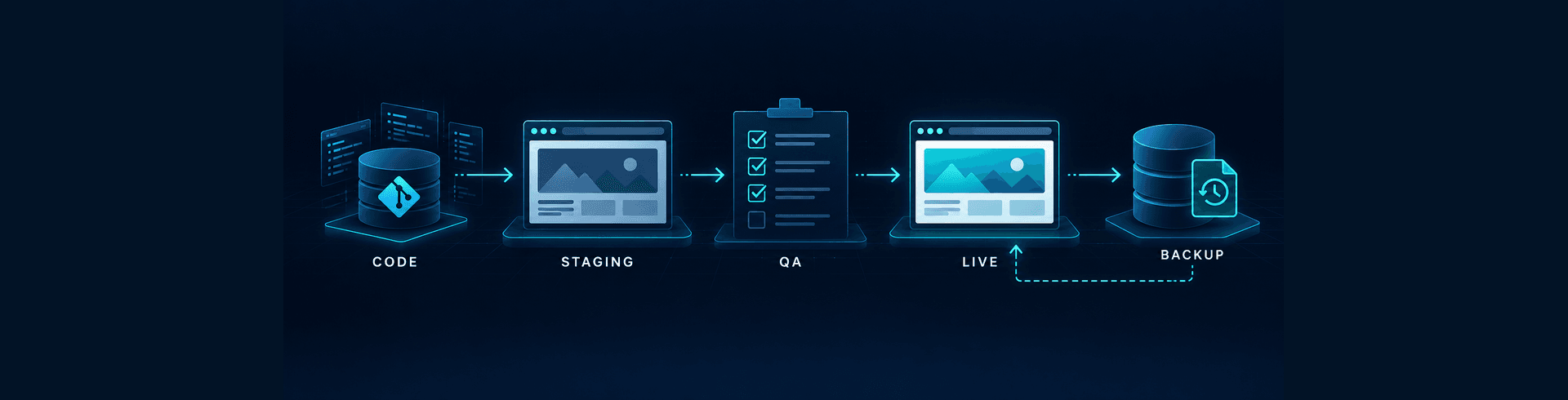


Reliable WordPress delivery is not achieved by making releases smaller and hoping nothing breaks. Enterprise teams need a release system that separates preparation from production, tests the changes that matter, preserves evidence, and provides a practical route back when a deployment behaves differently in the live environment. Without that discipline, even a minor plugin update can affect revenue, lead capture, search visibility, analytics, accessibility, or editorial operations.
A safe workflow connects staging, quality assurance, approvals, deployment, monitoring, and rollback as one operational process. It also recognises that WordPress is rarely isolated. Forms may feed a CRM, products may depend on payment and fulfilment systems, consent controls may govern analytics, and cached pages may be distributed through an edge network. Release management therefore protects business continuity, not only website code.
Why WordPress release management needs formal governance
Many teams still treat deployment as the final technical step after development. That creates a dangerous gap between “the change works on a developer’s machine” and “the change is safe for customers, editors, search engines, and connected systems.” A release can be technically successful while introducing incorrect tracking, stale cache, broken redirects, missing translations, inaccessible components, or failed transactions.
The risk increases as the platform grows. More plugins, custom integrations, environments, markets, and contributors create more dependencies. A clear WordPress plugin governance model reduces unnecessary change, but approved components still need controlled deployment. The release process should define who requests a change, who builds it, who tests it, who accepts the business impact, and who has authority to deploy or roll back.
Governance should be proportionate. A corrected spelling does not require the same controls as a checkout integration, but neither should bypass basic versioning, review, and recovery. Classifying releases by risk lets teams apply stronger evidence and approvals where failure would have the greatest impact.
Define a release path before work starts
The safest release begins during planning. Each ticket or change request should state the intended outcome, affected templates or systems, acceptance criteria, analytics impact, security implications, content dependencies, and rollback approach. If the team cannot explain how the change will be verified and reversed, it is not ready to enter development.
A practical environment path usually includes local development, a shared integration or development environment, staging, and production. Large programmes may add dedicated user-acceptance or performance environments. The important point is not the number of environments; it is that each has a clear purpose and that changes move through them in a controlled direction.
Keep environments meaningfully comparable
Staging should resemble production closely enough to reveal deployment risk. PHP and database versions, web server rules, critical plugins, theme code, caching layers, CDN behaviour, environment variables, and integration modes should be documented. Perfect parity is not always possible, especially where third-party services provide limited test environments, but every known difference should be visible to reviewers.
Configuration must not be copied blindly. Production credentials, customer information, payment keys, and analytics settings require environment-specific handling. When production data is needed for realistic testing, it should be minimised and sanitised. Access should follow least privilege, with multifactor authentication and auditable accounts rather than shared administrator credentials.
Make the release unit explicit
Teams should know exactly what is being released: a commit, build artifact, plugin package, database migration, content configuration, or coordinated set of changes. An immutable, versioned artifact is safer than manually copying files or repeating dashboard changes. The artifact promoted to production should be the same one that passed staging QA.
Database and configuration changes need special care because they may not reverse cleanly. A plugin activation can create tables, rewrite options, or transform stored content. The release record should distinguish reversible code changes from stateful changes that require a restore, compensating migration, or manual recovery procedure.
Build a staging workflow that produces evidence
Staging is useful only when it supports realistic review. It should not become a long-lived collection of unrelated unfinished changes. Create a release candidate with a defined scope, deploy it using the intended production method, and freeze that candidate while QA is completed. Late additions should restart the affected tests rather than quietly entering the release.
Before testing begins, confirm that the database and content state are appropriate, scheduled tasks are controlled, transactional email cannot reach real customers, and third-party services are in safe test modes. Search engines should not index staging, but robots controls alone are not sufficient protection; authentication or network restrictions provide stronger safeguards.
Record the build identifier, included tickets, environment configuration, test data, known limitations, and reviewer names. This evidence prevents confusion about which version was approved. It also shortens incident investigation because the team can reconstruct exactly what changed.
Use risk-based QA rather than a generic checklist
A standard regression suite is essential, but every release also needs tests derived from its specific risk. Changes to navigation require crawl and journey checks. A form change requires validation, consent, CRM delivery, notifications, and attribution testing. An ecommerce release requires product, cart, tax, payment, fulfilment, inventory, and refund scenarios. Teams operating complex stores should align release tests with their WooCommerce integration architecture.
Functional and editorial QA
Test the primary customer journeys on representative devices and browsers. Confirm navigation, search, forms, account actions, transactions, downloads, error messages, emails, and connected-system outcomes. Editorial reviewers should test the publishing workflow, previews, reusable blocks, media handling, permissions, scheduled content, and any custom fields affected by the release.
For multilingual websites, test both content directions, locale switching, translated navigation, metadata, forms, and fallback behaviour. Arabic and English platforms need deliberate review of layout and semantics; the wider governance considerations are covered in this guide to Arabic UX, RTL, and bilingual SEO.
Technical, performance, and security QA
Automated tests should cover critical application behaviour, coding standards, dependency vulnerabilities, and deployment checks where practical. Manual testing remains necessary for visual presentation, content meaning, assistive technology, and unusual integration states. Neither approach replaces the other.
Compare performance before and after the release using stable pages and conditions. Review templates most likely to be affected, not only the homepage. New JavaScript, fonts, tracking tags, images, and third-party widgets can change Core Web Vitals or responsiveness. The release plan should account for the interaction between page cache, object cache, and edge delivery described in the WordPress caching strategy guide.
Security testing should reflect the change. Review authentication, authorisation, input validation, file upload, API exposure, dependency changes, secrets, logs, and personal-data handling. A successful vulnerability scan is useful evidence, but it does not prove that business permissions or data flows are correct.
SEO, analytics, and accessibility QA
Check indexability, canonical tags, metadata, headings, structured data, internal links, XML sitemaps, robots directives, pagination, hreflang where relevant, and status codes. Template releases should be crawled before production. URL changes require a complete redirect map and validation, following the same principles used to avoid an enterprise SEO migration failure.
Analytics QA should confirm consent behaviour, tag firing, campaign attribution, form or commerce events, and data-layer values. Accessibility checks should include keyboard operation, focus order, labels, error handling, contrast, zoom, screen-reader announcements, and reduced-motion behaviour. Passing a visual review alone is not enough.
Set release approval around evidence and ownership
A release should have one accountable owner and named approvers for relevant disciplines. The approval record should include the candidate version, completed tests, unresolved issues, accepted risks, deployment window, monitoring owner, communication plan, and rollback decision-maker. Silence should never be interpreted as approval.
Define go and no-go criteria in advance. Examples include zero unresolved critical defects, successful backup verification, confirmed integration test results, approved content, acceptable performance movement, validated redirects, and available operational coverage. Predefined criteria reduce pressure-driven decisions during the deployment window.
Use a short change freeze before release so the approved candidate does not drift. Emergency changes should follow a separate documented path with narrower scope, faster but explicit approval, and mandatory post-release review.
Prepare the production deployment
The deployment plan should be executable by someone other than its author. It should list prerequisites, sequence, commands or platform actions, database steps, cache operations, smoke tests, expected duration, decision points, owners, and communication channels. Manual steps should be minimised and independently checked when they cannot be automated.
Schedule around business risk rather than developer convenience. Consider campaign launches, peak sales periods, editorial deadlines, regional working hours, integration support, and the availability of approvers. A low-traffic window helps, but releasing when nobody can diagnose an integration failure creates a different risk.
Take a restorable backup immediately before changes that affect files, configuration, or data. Verify that the backup contains what the recovery plan requires and that access to it does not depend on the failing production environment. A backup that has never been restored is an assumption, not a recovery capability.
Deploy in controlled, observable stages
During deployment, record timestamps and outcomes for each step. Where infrastructure permits, use blue-green, canary, or rolling techniques to limit exposure. WordPress hosting arrangements vary, but the underlying principle remains: reduce simultaneous change, verify early, and retain a known-good route.
Run immediate smoke tests after code and data changes but before declaring success. Confirm the homepage, key landing pages, login, publishing, forms, transactions, search, APIs, scheduled jobs, analytics, and error logging. Purge caches deliberately and verify both uncached and cached responses. A release is not complete merely because the deployment command returned successfully.
Monitor application errors, HTTP status trends, server resources, queue failures, payment or form success, page performance, search-engine access, and business conversion signals. Establish normal baselines before release so the team can distinguish a genuine regression from ordinary variation.
Design rollback before deployment
Rollback is a planned operational response, not an improvised decision after failure. Define which symptoms trigger rollback, who makes the decision, how quickly it must happen, what data may be affected, and how stakeholders are informed. The trigger should be objective where possible: a transaction failure threshold, error-rate increase, broken critical journey, security exposure, or material tracking loss.
Code rollback may be straightforward when releases are immutable and backward compatible. Database rollback is harder. If production has accepted orders, form submissions, registrations, or editorial changes after deployment, restoring an earlier database may destroy legitimate data. Prefer backward-compatible migrations, feature flags, and compensating changes where feasible.
Test the rollback procedure in staging using the same artifact and migration path. Measure recovery time and verify the platform after reversal. The team should also understand the difference between rollback and incident recovery. If the release reveals or introduces a compromise, follow a full containment and recovery process such as the WordPress malware incident response playbook.
Close the release with operational learning
Continue heightened monitoring for a defined observation period. Some failures appear only when scheduled jobs run, caches expire, traffic rises, or third-party systems process delayed events. Confirm that alerts reach an accountable person and that support teams know what changed.
Close the release record with actual deployment time, test results, incidents, rollback status, and outstanding follow-up work. For significant releases, hold a short review that asks what was detected early, what escaped, which manual steps caused uncertainty, and which controls should be improved. The goal is not blame; it is a safer and faster delivery system.
Measure release quality through outcomes such as change failure rate, rollback frequency, mean time to recovery, escaped defects, deployment duration, approval delay, and percentage of automated checks. Speed alone is a weak metric. A team that deploys frequently but repeatedly disrupts customers is not operating effectively.
A practical release readiness checklist
- The release scope, owner, risk level, and acceptance criteria are documented.
- The exact versioned artifact has passed staging and has not changed since approval.
- Functional, editorial, integration, performance, security, SEO, analytics, and accessibility tests appropriate to the change are complete.
- Known environment differences and accepted risks are recorded.
- Content, translations, redirects, metadata, schema, and tracking are approved where affected.
- A verified backup and a tested rollback method are available.
- The deployment window, owners, approvers, support contacts, and communication path are confirmed.
- Smoke tests, monitoring thresholds, and rollback triggers are ready.
- Post-release observation and ownership have a defined end point.
Element8 helps UAE organisations establish dependable WordPress delivery workflows across platform engineering, QA, performance, security, SEO, and operational governance. If releases are creating avoidable risk or recurring manual effort, our Dubai web development team can assess the current process and design a safer path from staging to production.
Frequently Asked Questions
What is a safe WordPress release workflow?
A safe workflow defines the change, builds a versioned release candidate, tests it in a production-like staging environment, records approval, verifies backups and rollback, deploys through a repeatable process, runs smoke tests, and monitors technical and business outcomes.
How closely should WordPress staging match production?
It should match the production software stack, critical configuration, caching behaviour, integrations, and deployment method closely enough to reveal meaningful risk. Necessary differences, such as test credentials and sanitised data, should be documented and included in QA planning.
When should a WordPress deployment be rolled back?
Rollback should begin when predefined thresholds are met, such as a broken critical journey, material transaction or form failure, security exposure, severe error increase, corrupted data, or a regression that cannot be corrected safely within the agreed recovery window.
Can a database change always be rolled back?
No. Restoring an earlier database can remove valid production activity created after deployment. Teams should prefer backward-compatible migrations, tested compensating changes, feature flags, and recovery plans that protect new orders, submissions, accounts, and editorial updates.